Features Pro Privacy Support DE
Coming soon to the App Store

Every skyscraper
you've stood beneath.

More than 800 towers from Chicago to Shenzhen, on a map and in your pocket. Stamp the ones you've actually visited — and watch them rise again as a 3D city built entirely from your own travels.

Coming soon to the App Store Free to explore · No ads, no tracking
Skyline Explorer app icon

A skyscraper atlas that remembers where you've been.

Browse the whole world for free. The parts marked Pro are the ones I built from scratch — the 3D work and the travel book.

🏙️

800+ skyscrapers

Across more than 130 cities in 50 countries, from the Empire State Building to Jeddah Tower. Heights, floors, years and architects are bundled into the app, so the atlas itself works offline.

🗺️

World map

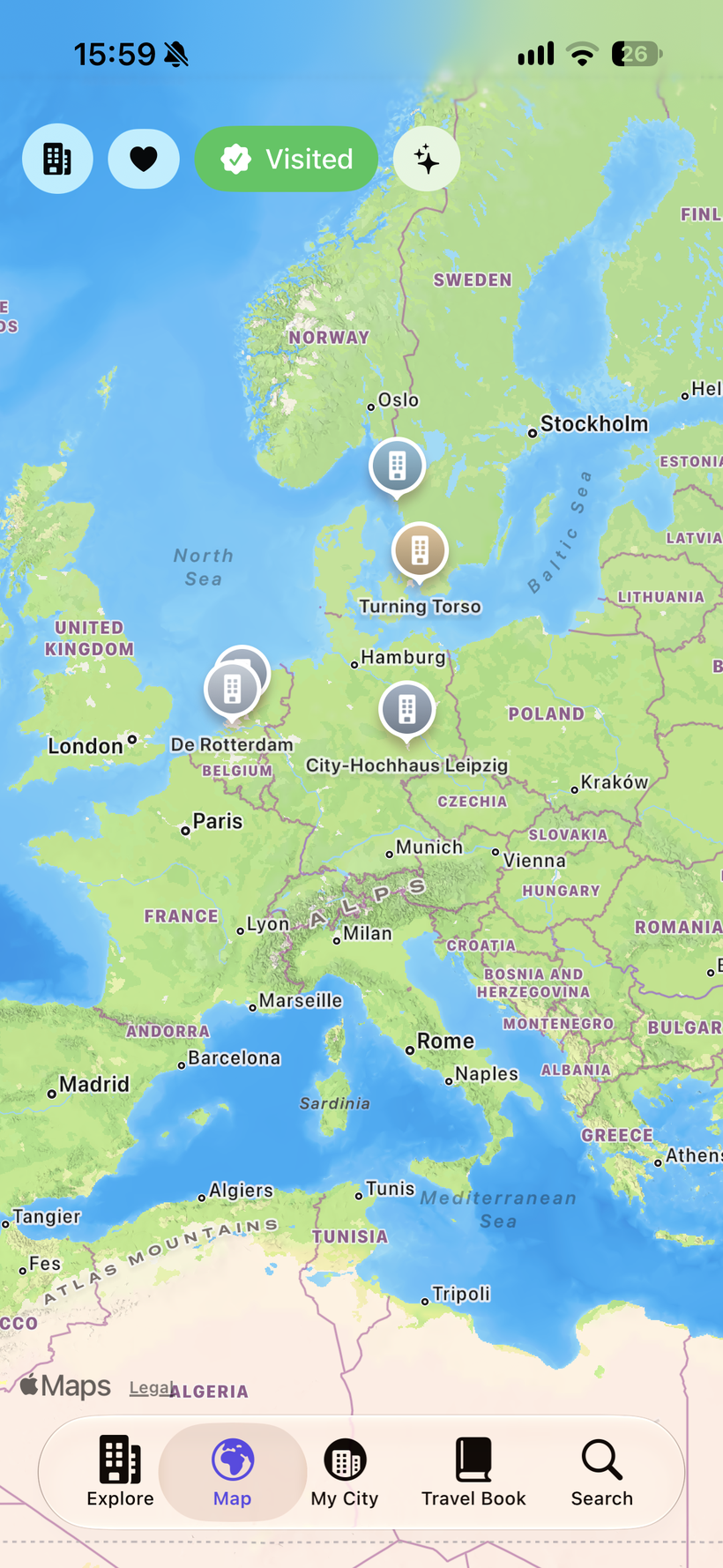
The 250 tallest on one Apple Maps view, so it stays fluid. Filter to your visited, favorites or wishlist and every one of those gets a marker, however short.

🔎

Search, sort, filter

By name, city or country. Sort by height, name or completion date, and narrow by continent or whether a tower is finished, rising or still on paper.

☀️

Skyscraper of the Day

One building picked every morning, the same for everyone, with its photo and story. A small reason to open the app on a Tuesday.

📖

Travel Book

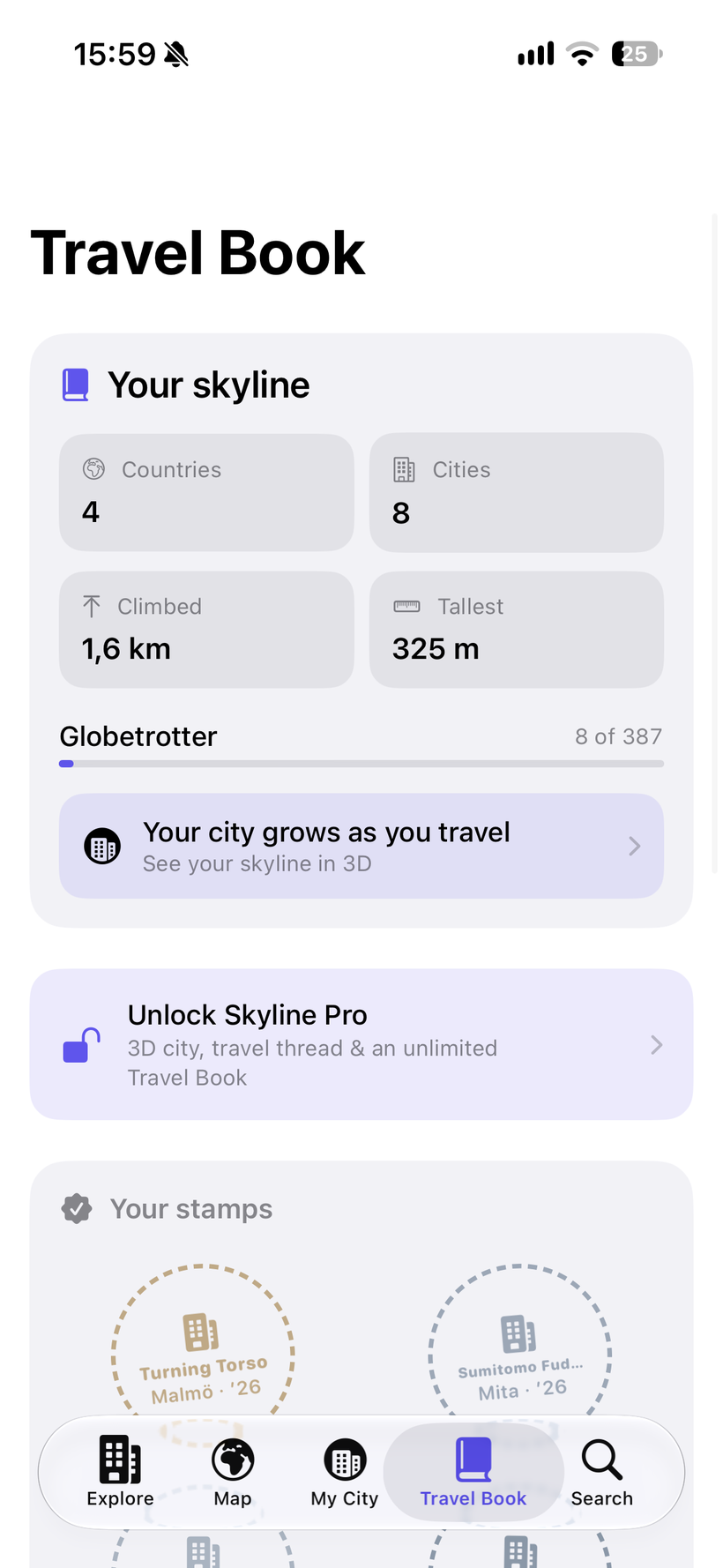
Stamp a tower once you've stood beneath it. The book counts your countries, cities and total metres climbed, and keeps the date of every visit.

🏛️

Browse by architect

Follow a name — Adrian Smith, SOM, Gensler — through every tower they put on the list. Or work through a whole continent.

Pro 🧊

3D models

Every building as an interactive model you can orbit, tilt and zoom — generated from its real height and silhouette, with lit windows after dark.

Pro 🌆

My City

Your visited towers assembled into one imaginary skyline you can walk around. Streets, traffic, aviation beacons, and a day-night switch.

Pro 🧵

Travel thread

A line drawn across the map through your visits in the order you made them — your own route through the world's tall buildings.


What it looks like.

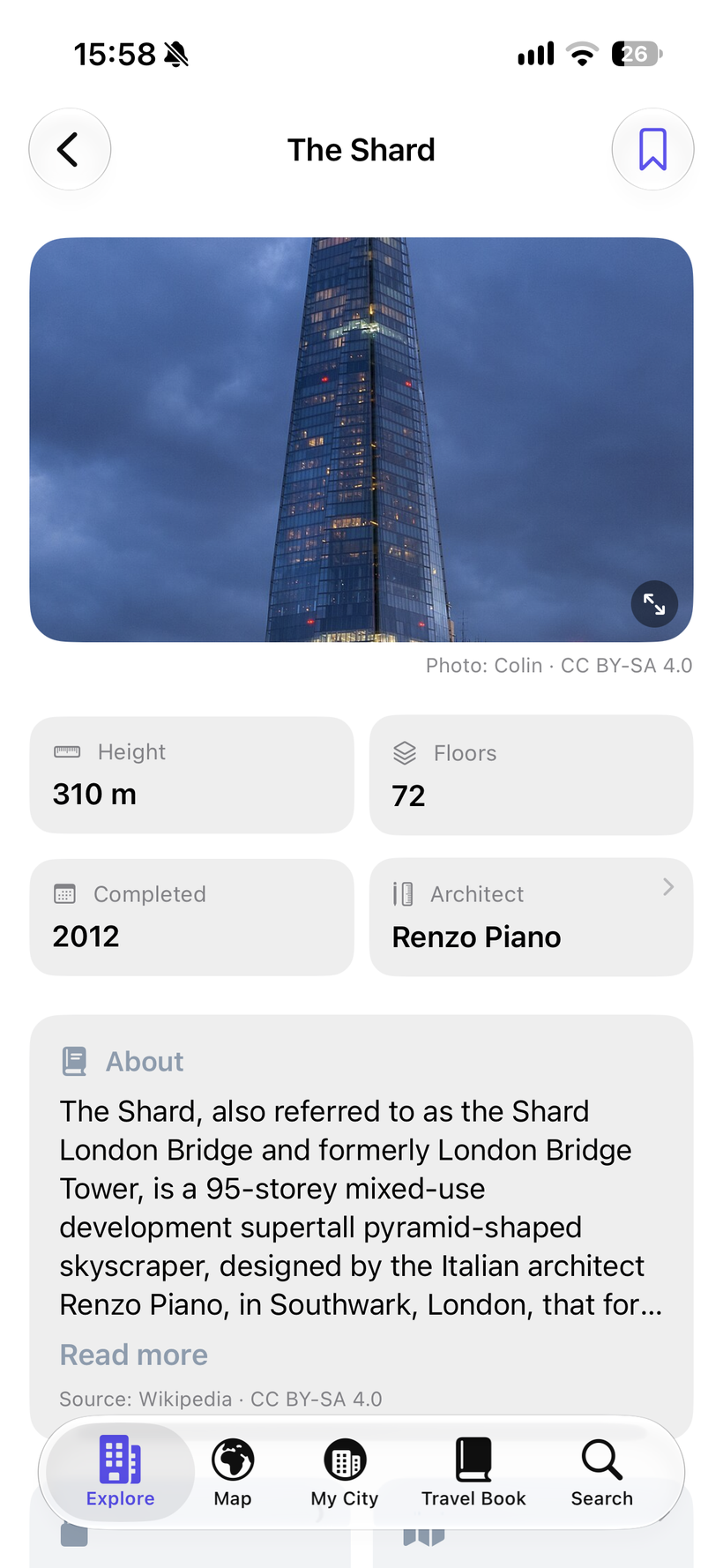
The Shard's building card, with photo, facts and Wikipedia extract
Building cardFacts, photo and story
The world map filtered to visited skyscrapers
MapFiltered to your visits
The Travel Book with countries, cities, metres climbed and visit stamps
Travel BookYour stamps and stats
My City, a 3D skyline built from visited buildings
My CityYour skyline in 3D

Free to explore. Pay once for the 3D.

The facts, photos and descriptions come from Wikipedia and Wikidata, so reading them stays free — charging for other people's donated work would be wrong. Pro unlocks the parts I made.

Free
no account, no ads
  • Every building in the atlas — with a photo and description wherever Wikipedia has one
  • The world map, search, sorting and filters
  • Favorites, wishlist and Skyscraper of the Day
  • Browse by architect and by continent
  • Your first 10 Travel Book stamps

Enough to feel the whole thing before you decide.

No account. No analytics. No tracking.

Skyline Explorer has no server of mine behind it. Your visits, favorites and wishlist never leave your phone, and I have no way of seeing them.

  • No analytics or tracking SDKs
  • No advertising networks
  • No account, no sign-in, ever
  • Your visit photos and notes never leave the device
  • Your visits stay on-device via Apple's SwiftData
  • The whole atlas is bundled — it works offline
  • Photos and descriptions load from Wikimedia on demand

Privacy Policy

Last updated: August 2026

What does Skyline Explorer collect?

Nothing. The app has no account system, no analytics, no advertising SDKs and no third-party tracking libraries. I never see which buildings you look at or which ones you mark as visited.

What is stored on your device?

  • Which buildings you've marked as visited, favorited or wishlisted, and the date of each visit
  • Any note you write about a visit, and any photo of your own you attach to it
  • Which building was picked as Skyscraper of the Day today
  • A cache of the photos and descriptions you've already viewed

This is stored with Apple's SwiftData and UserDefaults, in the app's own container; your own photos are saved as ordinary files alongside it. All of it is included in your normal iPhone backup and is deleted when you delete the app. Choosing a photo uses Apple's system picker, which hands the app that one image and gives it no access to the rest of your photo library.

What leaves your device?

The building facts — heights, floors, years, coordinates — ship inside the app, so browsing and the map work with no connection at all. Photos and the descriptive texts are fetched from Wikipedia and Wikimedia Commons when you open a building's card, which means Wikimedia's servers see the request the way they would if you opened the article in Safari. No identifier of you or your device is attached, and the results are cached so the same building isn't fetched twice.

Maps

The map is Apple's MapKit. Map data is requested from Apple as you pan and zoom, under Apple's privacy policy. The app does not request your location and cannot see where you are.

The Skyline Pro purchase

Skyline Pro is a one-time in-app purchase handled entirely by Apple. Payment details go to Apple, never to me, and I receive no personal data from the transaction — only the anonymous, aggregated sales figures every developer sees.

Children's privacy

Skyline Explorer collects no data from any user, including children under 13.

Changes to this policy

If this changes in a future update, the new version will be posted here with a new date.

Contact

Questions? support@engelheartware.de


Need help?

Happy to help with any questions or feedback — I aim to reply within a few days.

📬

Get in touch

Send me an email. I read every message.

🐛

Report a bug

Tell me what happened, what you expected, and your iOS version — it helps a lot. Send report →

🏗️

A building is missing

Or a detail is wrong. Send me the name and city and I'll get it into the next update. Suggest a tower →

Common questions

Do I need Pro to use the app?

No. Every building, the map, search and the Skyscraper of the Day are free, along with your first 10 visit stamps. Pro adds the 3D city and unlimited stamps.

Is it a subscription?

No. Skyline Pro is a single €4.99 purchase. There is no subscription in this app and there isn't going to be one.

Does it work offline?

The buildings, the list, the search and your Travel Book do. Photos and descriptions need a connection the first time you open a building — after that they're cached.

Where does the data come from?

Facts from Wikidata, descriptions from Wikipedia, photos from Wikimedia Commons — each credited in the app with its author and licence. See the credits below.

Can I stamp a building that isn't finished?

No — more than 120 of the towers are still planned or under construction, and you can browse them, but the stamp only unlocks once a building actually exists.

What iOS version do I need?

iOS 18 or later, on iPhone and iPad.

Credits. Building data from Wikidata (CC0). Descriptions from Wikipedia, used under CC BY-SA 4.0 and shown unmodified with a link to the source article. Photographs from Wikimedia Commons under their individual licences — every photo in the app carries its photographer and licence, linking to the file page. Maps by Apple. The 3D models are original procedural geometry generated in the app, not third-party assets.